
Getting started with Rust
Rust is a powerful programming language known for performance and reliability, but learning it as a beginner can feel overwhelming at first.
In this beginner guide, we share our perspective on the early stages of learning Rust and resources that can support you along the way. We hope this overview makes the first steps clearer and helps you build your Rust skills using JetBrains tools.

In this guide you will find
- Rust basics and core concepts
- Step-by-step learning path
- Rust and other programming languages
- RustRover learning features
- Common beginner mistakes
- Common questions when learning Rust
- Frequently asked questions
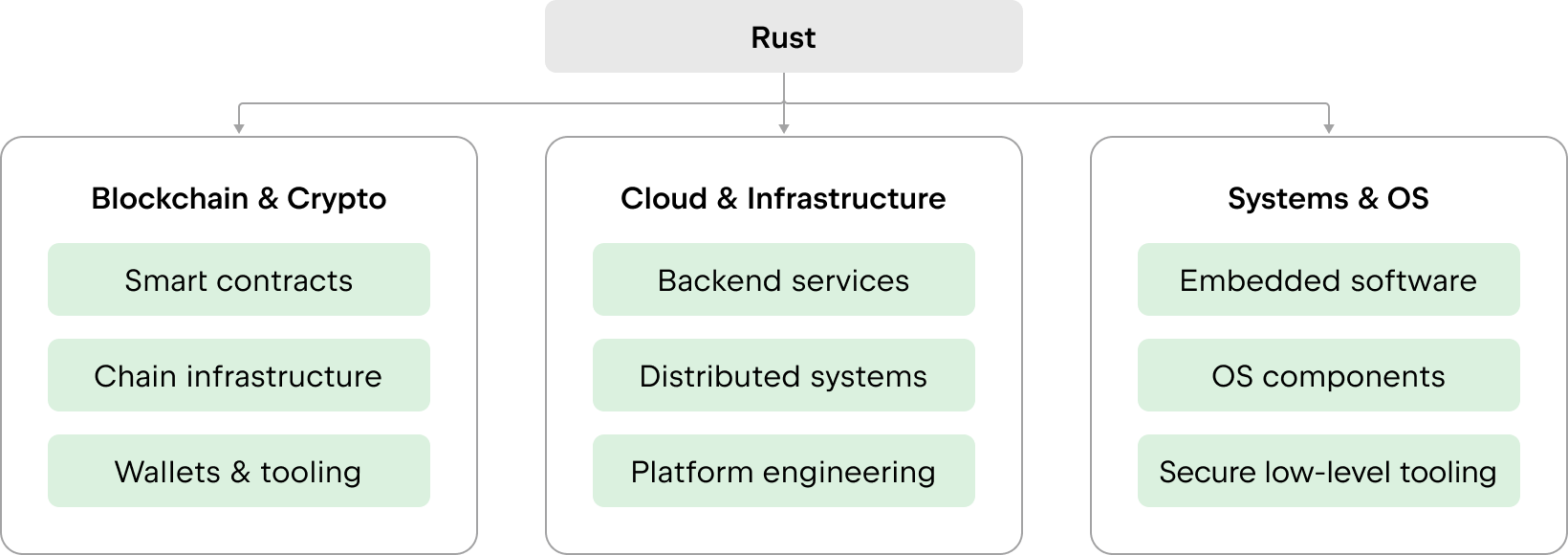
What makes Rust challenging for beginners
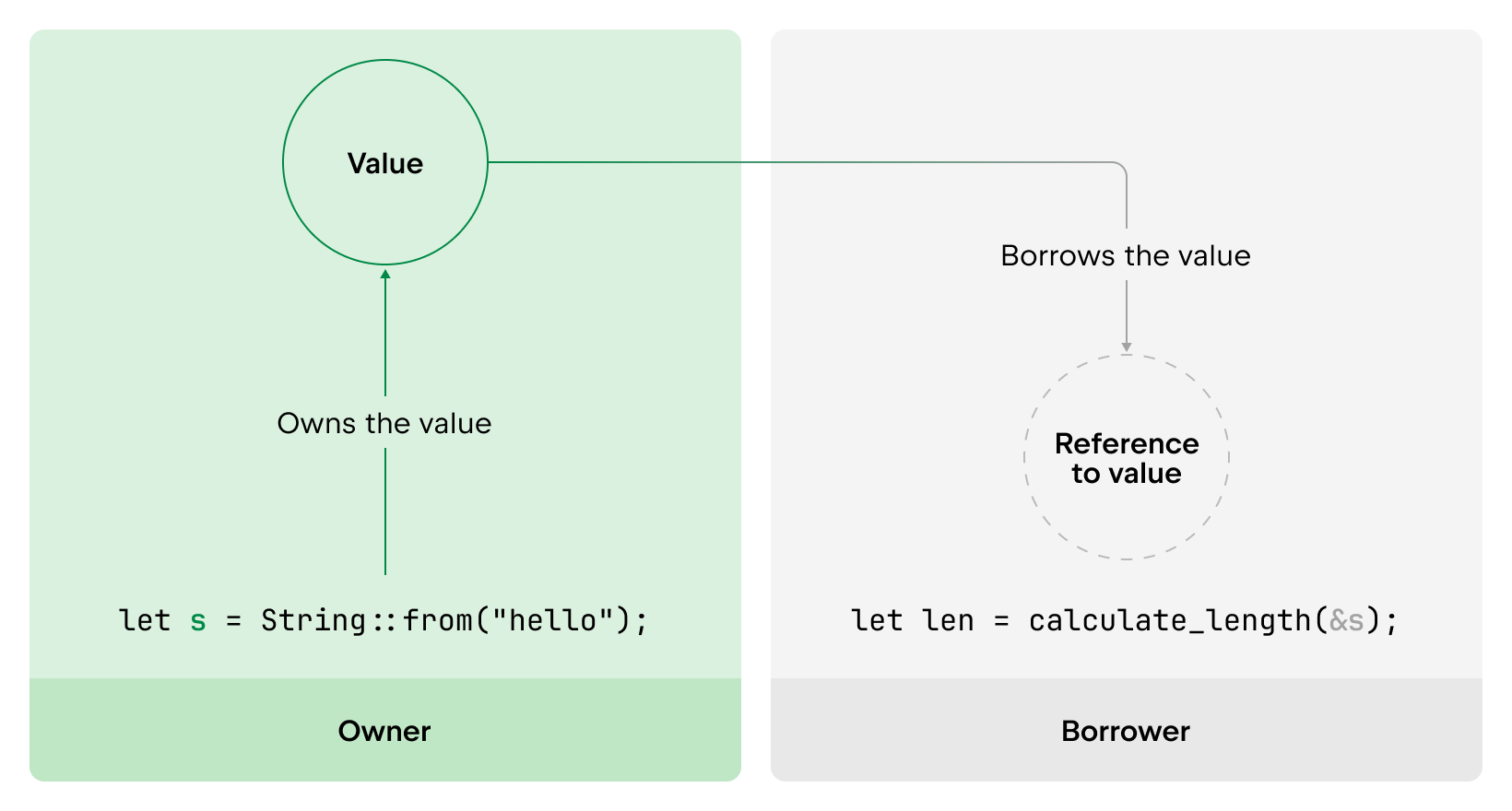
Many developers find Rust challenging at first when learning it, because it introduces concepts such as ownership, borrowing, and lifetimes, which make it different from other languages. These concepts define who owns a piece of data, how it can be shared, and how long it is allowed to exist. These ideas change how you think about memory and data sharing, especially if you are coming from languages such as Java, Python, or JavaScript, where memory management is handled automatically.
Early compiler errors are common and expected. The most effective way to move forward is to start with small examples, read the compiler messages carefully, and practice regularly.
Over time, these concepts become natural. They don’t just make code easier to understand and maintain; they also make it safer to evolve. Strong static analysis and clear ownership rules give you confidence when refactoring, renaming, or restructuring parts of your program. Many changes that would feel risky in other languages are checked and validated at compile time.
Rust concepts explained
Rust programs are organized into functions grouped in modules. Functions work with values that are statically typed, meaning every value or expression has a defined type at compile time.
The language provides both primitive and compound types (like arrays and structs), while the standard library adds many collection types. Rust also supports generics for defining reusable, type-independent code and traits. These traits create groups of methods that can be implemented for specific types.
Together, generics and traits give Rust the same level of abstraction as object-oriented languages with inheritance and polymorphism.
Memory management
Rust’s memory management is built on a simple rule: The compiler knows exactly when memory is allocated, accessed, and released. It automatically inserts the necessary instructions into the code, preventing common memory issues found in other languages.
Unlike garbage-collected languages like JavaScript, Python, or Java, Rust does not rely on a runtime garbage collector, saving runtime overhead and ensuring both safety and performance.
Concurrency
Concurrency enables a system to perform multiple tasks at once, improving efficiency and performance. In many languages, this can easily lead to hard-to-debug errors when different parts of a program run at the same time and access shared data.
In Rust, concurrency is built on the same ownership and type system that ensures memory safety. Early in design, the team treated memory safety and concurrency as separate challenges. Over time, they discovered that the ownership and type systems form a powerful foundation for solving both.
Instead of addressing memory bugs and concurrency bugs with different mechanisms, Rust handles them through one consistent model. The same rules that govern how data is owned and borrowed also help avoid data races and other common concurrency issues.
Rust helps catch many of these problems early, before your program ever runs. That’s why users often describe Rust’s concurrency as fearless.
Among other reasons, this approach is possible because
- Ownership rules help ensure that data shared between tasks is used safely.
- Immutable data makes it easier to reason about code that runs in parallel.
- Passing data between tasks using channels reduces the need for shared mutable state.
- Rust’s memory and lifetime system prevents many common concurrency mistakes at compile time.
- Async programming lets you write concurrent code in a clear and structured way, without relying on complex patterns.
This explains why Rust can guarantee safety and performance without a garbage collector.
Writing code with functions, values, and types. For many developers, this is the most familiar part of learning Rust, since functions, values, and types are common across many languages.
Your first steps in Rust
Start learning with confidence
When starting something new, it’s always easier to have a plan to follow. Here is our suggested path for getting started with Rust and learning it step by step, based on our experience.
Rust vs. Python, JavaScript, and other programming languages
Rust is rarely the first programming language developers learn. Most people who come to Rust already have experience with JavaScript, TypeScript, Python, Java, C, or C++, and start exploring Rust alongside the tools and technologies they already know.
If you are coming to Rust from another language, these guides can help you compare Rust with familiar ecosystems and understand where it fits best.
Rust and JavaScript
Learn how Rust and JS/TS work together through WebAssembly, tooling, and hybrid web architectures.
Rust and C/C++
Compare Rust with C and C++ for systems programming, memory safety, performance, and long-term maintainability.
Rust and Java
Compare Rust and Java for backend development, performance, memory safety, tooling, and long-term maintainability.
Learning Rust often involves running into new kinds of errors during practice. These mistakes are a normal part of the process and usually signal that you are engaging with important concepts about memory and data flow.
Many of these errors are closely connected, as they stem from the same model of Rust’s ownership system. This means that once you start understanding that model, the way you approach and resolve these issues becomes more consistent and predictable.
Below are some of the most common challenges beginners face, along with details about how the right tooling can help make them easier to understand.
Common beginner mistakes and how RustRover helps you avoid them
Ownership errors
Ownership defines what parts of the code are allowed to access and modify data at any point in a Rust program. Beginners often run into errors when values are moved unexpectedly or when multiple parts of the code try to use the same data. These errors exist to prevent memory bugs. Clear compiler messages and editor hints in RustRover can help you see where ownership changes and understand why the code is not allowed.
Borrow checker issues
The borrow checker ensures that references do not conflict with each other. Errors commonly appear when mutable and immutable borrows overlap. While these rules can feel restrictive, they help prevent data races and invalid memory access. Tooling support can make these situations easier to understand by pointing to overlapping borrows and showing how references interact.
Lifetime confusion
Lifetimes describe how long references are valid and make sure they never outlive the data they point to. New Rust users can struggle with lifetime errors because the rules are enforced implicitly by the compiler. Helpful explanations and in-editor guidance make it easier for you to understand these relationships without having to manually trace reference scopes.
Depending on your setup and the languages you already use, several JetBrains IDEs can support Rust in different ways. If you want to try these workflows yourself, you can explore the other JetBrains IDEs below:

RustRover
A dedicated JetBrains IDE for Rust development

CLion
A cross-platform JetBrains IDE for C and C++ development

IntelliJ IDEA Ultimate
A full-featured JetBrains IDE for Java, Kotlin, and polyglot development
RustRover learning features
RustRover offers a variety of features that help you learn Rust and explore it while you code.
Error highlighting
RustRover highlights syntax, type, and compiler-related issues directly in the editor. Seeing errors in context helps you understand problems earlier and connect them to the code you are writing.
Refactoring
Refactoring tools make it possible to rename symbols, extract functions, and reorganize code safely. This supports experimentation and learning without compromising correctness.
Testing support
Built-in functionality for running tests and debugging helps you validate assumptions and understand how changes affect behavior. Clear feedback makes tests a practical learning tool, not just a verification step.
Debugger
Step through your program line by line and observe how it behaves at runtime. You can inspect variables, follow the execution flow, and see how different parts of your code interact. This helps turn theory into practice and makes it easier to understand how your Rust programs actually work.
Borrow-checker insights
Ownership, borrowing, and lifetime-related issues are surfaced inline. Visual cues and navigation help you understand how references interact across your code and why certain patterns are not allowed.
Context-aware code completion and fast navigation help you explore APIs, types, and traits as you learn. This reduces the need to switch constantly between code and documentation.
Junie
Junie is an AI coding agent by JetBrains that supports Rust development by helping you explore code, understand context, and work through implementation ideas. It can give you a leg up when learning new patterns or working with unfamiliar code while allowing you to stay focused on problem-solving.
Documentation and quick help
Inline documentation, type information, and quick-help views make it easier to understand unfamiliar constructs and library APIs while staying focused on the code.
AI Assistant
AI Assistant can help explain compiler errors, Rust concepts, and code behavior. This is useful when you’re learning new patterns, working through feedback from the compiler, or trying to understand why a particular approach is discouraged.
Claude Agent, Codex, and external ACP-compatible agents
In the AI chat, you can also work with Claude Agent, Codex, and external ACP-compatible agents. This gives you more flexibility when you want to compare approaches, use a preferred agent, or bring other compatible tools into your workflow.
RustRover trusted partners
We work with trusted partners who create high-quality Rust courses, workshops, and practical resources that can help you build coding skills with more structure and support.