
ReSharper Is Opening Visual Studio to More AI Agents
The Journey Starts with Junie.
JetBrains is building an ecosystem where you control your AI experience. No vendor lock-in. No forced choices. Just the freedom to use the agents and models that work best for you.
This Preview release introduces Junie, our first step toward full ACP (Agent Client Protocol) support in ReSharper inside Visual Studio. Junie is an LLM-agnostic agent, you don't have to wait for the full Registry to break free — pick your model and start now.
Ready to break free from vendor lock-in?
1
Click below to download the installer for ReSharper and the JetBrains AI Assistant plugin with Junie on board.
2
Help us break the lock-in. Take a survey to tell us which AI agents you want to use for which workflows, and influence the integration.
Coming Soon: the ACP Agent Registry
The ACP Agent Registry will transform ReSharper into an open AI ecosystem, ensuring you always have the right tool for the job. Soon you'll be able to:
Discover agents
Explore local, remote, and in-house agents
Set up easily
All agents connect through the same interface
Switch between agents
Choose the best ones for each task
Stay current
Get the latest models as they are released
Getting Started
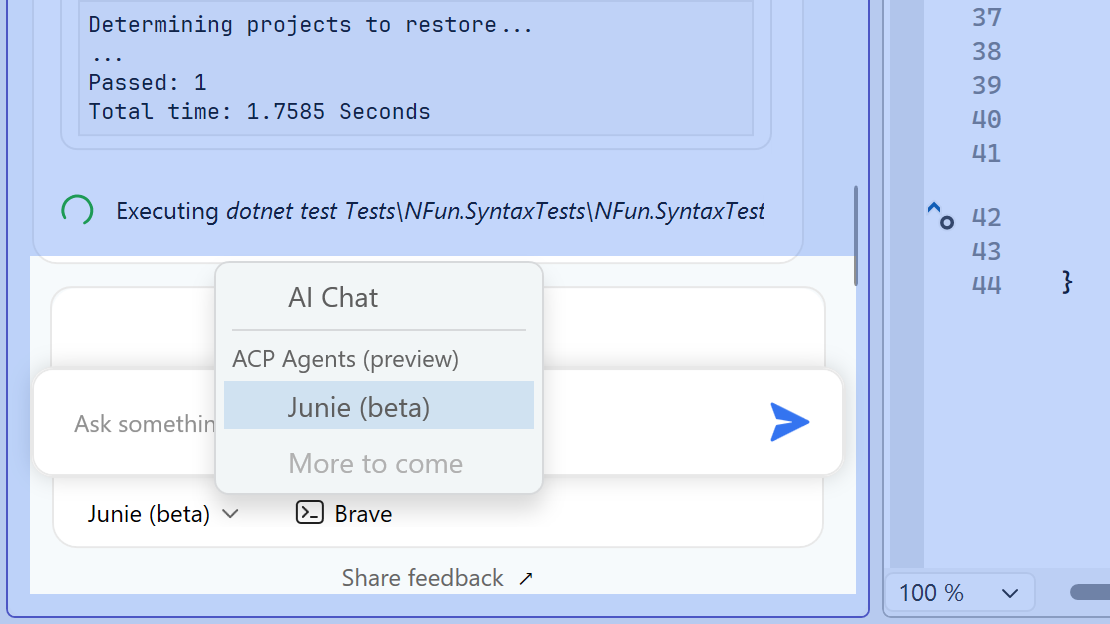
Enabling Junie inside AI Assistant:
In the AI Assistant tool window select Junie from the drop-down list of available agents.
- If you have a JetBrains AI subscription: You can proceed directly to the chat. Junie components will unpack on your first prompt.
- If you do NOT have a subscription: A licensing dialog will appear with a "Start Trial" button. To start the free trial, you will need to accept the Terms & Conditions and provide bank card information (this is strictly a fraud prevention measure, your card will not be charged).
More information is available in our documentation.

Switching models:
- Navigate to Extensions | ReSharper | Options | AI Assistant | Junie to select different model options.
- Click Save and Junie will have the selected LLM model activated.
Troubleshooting:
If you have trouble launching the AI Chat tool window, please make sure you don’t have AI Assistant disabled in ReSharper. To check if that might be the culprit, go to Extensions | ReSharper | Options | AI Assistant | General and check the AI Assistant box.
Help Us Break the Lock-in
This preview is an experiment. We want to know if an open AI ecosystem in ReSharper is something you actually want.
Tell us what to build next:
Click "Share Feedback" in the AI Chat tool window to access our survey at any time.
Let us know how the integration feels, and more importantly, tell us exactly which AI agents you want to see in the Registry.
Your input will directly influence how we expand agent support in ReSharper.